Build your own marketplace from scratch using Medusa
Now that our vendors have access to their store, I can tell they are getting bored. Indeed, without any things to sell, our back office is useless, therefore we’re spending this time expanding the product concept and adding a decent bit of customization.
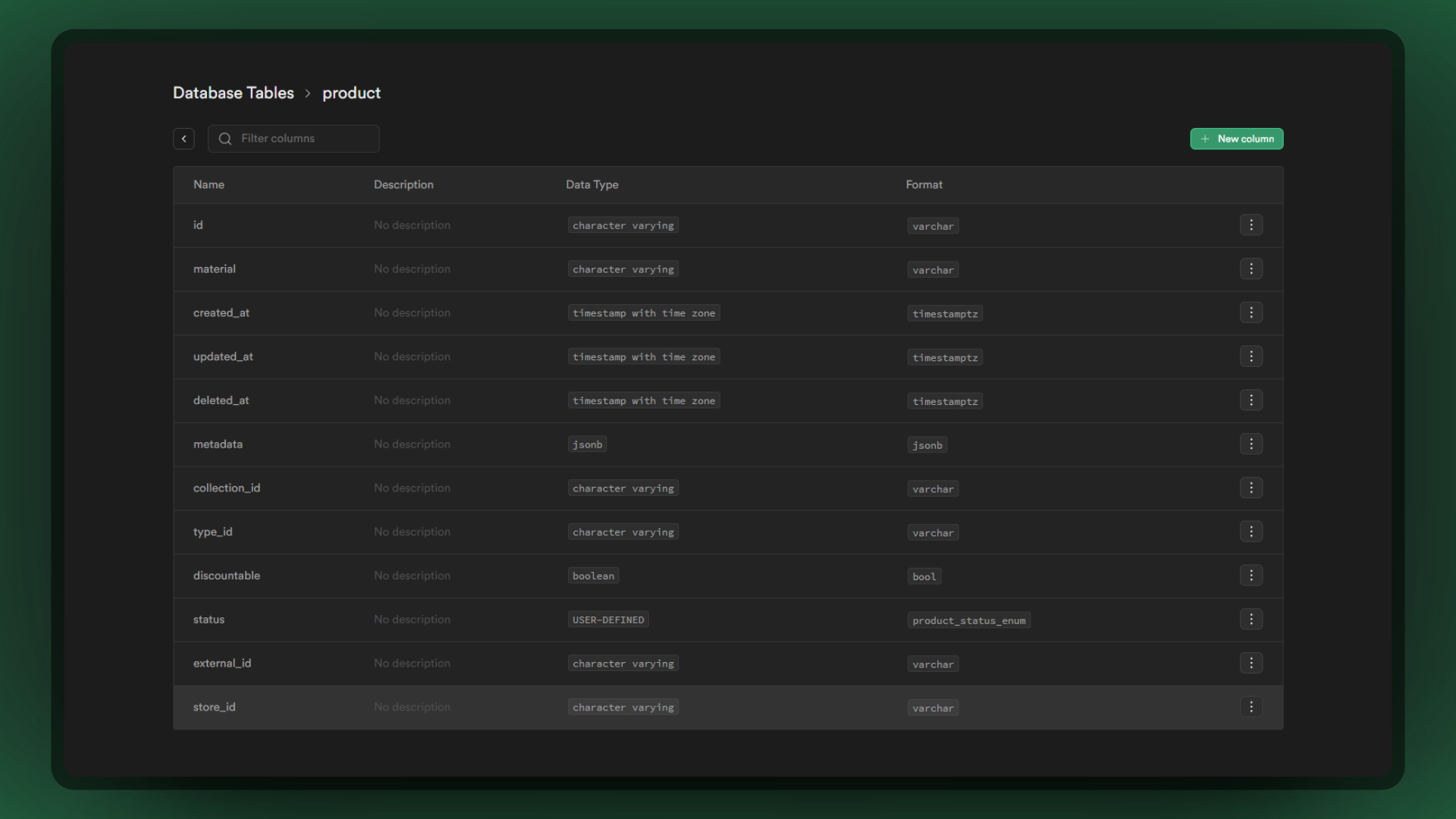
Here is where we define the new schema for the product table. In fact, we want to associate a Product with a Store, therefore we use the same reasoning as the User table we extended earlier
src/models/product.ts
import { Column, Entity, Index, JoinColumn, ManyToOne } from 'typeorm'import { Product as MedusaProduct } from '@medusajs/medusa'import { Store } from './store'@Entity()export class Product extends MedusaProduct { @Index('ProductStoreId') @Column({ nullable: true }) store_id?: string @ManyToOne(() => Store, (store) => store.products) @JoinColumn({ name: 'store_id', referencedColumnName: 'id' }) store?: Store}
A relationship with the Store implies an update of the previously extended Store model
src/models/store.ts
import { Entity, OneToMany } from 'typeorm'import { Store as MedusaStore } from '@medusajs/medusa'import { Product } from './product'import { User } from './user'@Entity()export class Store extends MedusaStore { @OneToMany(() => User, (user) => user.store) members?: User[] @OneToMany(() => Product, (product) => product.store) products?: Product[]}
To create a Product tied to a Store, we’ll start by extending the ProductService and overriding the create function to force the logged-in user’s store_id into the product before inserting it. However, you will see type problems with the input type expected on the method, therefore we will need to expand the type to add our new store_id property
src/services/product.ts
import type { CreateProductInput as MedusaCreateProductInput } from '@medusajs/medusa/dist/types/product'import { ProductService as MedusaProductService } from '@medusajs/medusa'import { Lifetime } from 'awilix'import type { User } from '../models/user'import type { Product } from '../models/product'// We override the type definition so it will not throw TS errors in the `create` methodtype CreateProductInput = { store_id?: string} & MedusaCreateProductInputclass ProductService extends MedusaProductService { static LIFE_TIME = Lifetime.TRANSIENT protected readonly loggedInUser_: User | null constructor(container) { // @ts-ignore super(...arguments) try { this.loggedInUser_ = container.loggedInUser } catch (e) { // avoid errors when backend first runs } } async create(productObject: CreateProductInput): Promise<Product> { if (!productObject.store_id && this.loggedInUser_?.store_id) { productObject.store_id = this.loggedInUser_.store_id } return await super.create(productObject) }}export default ProductService
Okay, at our level here, we can be sure that a User who is logged in AND has a store_id must be able to create a product for its store.On the other hand, when a User wants to retrieve products, there are currently no constraints preventing him from seeing ONLY its store’s products, let’s implement this feature.
ProductService.listAndCount is the function that retrieves products used in the back-office, therefore we’ll alter it to include the logged-in user’s store_id to retrieve only his products. However, the selector of this function does not know the store_id property at all, so we will expand the selector to make it aware of that new property
The product.handle might create an issue in the long term when creating a product for a store, as it’s supposed to be unique. You can for example either add a prefix or suffix containing the store_id to avoid any problems :
// src/services/product.tsclass ProductService extends MedusaProductService { // ... rest async create(productObject: CreateProductInput): Promise<Product> { if (!productObject.store_id && this.loggedInUser_?.store_id) { productObject.store_id = this.loggedInUser_.store_id // This will generate a handle for the product based on the title and store_id // e.g. "sunglasses-01HXVYMJF9DW..." const title = productObject.title.normalize('NFD').replace(/[\u0300-\u036f]/g, '').replace(/\s+/g, '-').toLowerCase() const store_id = this.loggedInUser_.store_id.replace("store_", "") productObject.handle = `${title}-${store_id}` } return await super.create(productObject) }}
I want to retrieve products from a specific store only from my storefront
For that you’ll need to create a loader, that will extend the default /store/products relations and allowed fields.First you’ll need to create a new loader in the /src/loaders/ directory :
Then we’ll extend the validators of the /store/products API route, the goal here is to be able to add a query parameter /store/products?store_id=<STORE_ID> , and the default Medusa validator for that API is not aware of the new property we wants to add.Next step, is to create a file in the /src/api/ folder, named specifically index.ts .
src/api/index.ts
import { registerOverriddenValidators } from "@medusajs/medusa"// Here we are importing the original Medusa validator as an alias :import { StoreGetProductsParams as MedusaStoreGetProductsParams,} from "@medusajs/medusa/dist/api/routes/store/products/list-products"import { IsString, IsOptional } from "class-validator"// Here we add the new allowed property `store_id` :class StoreGetProductsParams extends MedusaStoreGetProductsParams { @IsString() @IsOptional() // Optional of course store_id?: string}// The following function will replace the original validator by the new one.registerOverriddenValidators(StoreGetProductsParams)
Now you can successfully retrieve all products from a specific store like this.
In the same way that we have notified the database of new changes thanks to migrations, we will have to do the same with our packages, which are not aware of new properties.Remember to declare your types according to your needs. In our case, we only need the following types :
src/index.d.ts
import type { Product } from './models/product'import type { Store } from './models/store'declare module '@medusajs/medusa/dist/models/product' { interface Product { store_id?: string store?: Store }}
We now have the foundation; vendors can access the admin UI and create/list products associated with their store; in the next phase, we will extend entities to allow each store to create its own shipping options.
Support my work
Your support helps me dedicate more time to creating high-quality content and building tools that benefit the community.
Extend the Shipping Models
This is the next chapter of this series, where we’ll learn how to extend the Shipping Models.